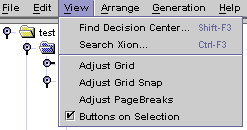
| Find decision center: |
shows a dialog were every defined decision center is referenced;
decision centers are shown in a tree; the first node (All)
includes every decision center, alphabetically ordered; you can also
find a decision center in the file / directory hierarchy; this dialog
allows to find a decision center thanks to its identifier number; a button
(Remove unused decision center) starts the action described
in the Edit menu; pressing the OK
button, or double-clicking the tree, shows the decision center in one of
its file context; an unused decision
center cannot be showed |
| Search Xion: |
finds a text in all Xion program code; select first the top of the
searched text and the text itself; use the finder
properties |
| Show complete webfile: |
opens a new window with the complete hierarchy of webfiles and decision center that are used by the current webfile. More... |
| Adjust grid: |
changes the background grid in the class diagrams; this property is
not saved in the project |
| Adjust grid snap: |
changes the granularity of the background grid in the class diagrams;
this property is not saved in the project |
| Adjust page breaks: |
shows a broken line where the class diagram is broken to be printed;
this property is not saved in the project |
| Buttons on selection: |
shows tool buttons when the mouse enters a selected class in a class
diagram |